Summary
Be sure to include EBSCO's Explora when gathering back to school resources.
BadgerLink resources Explora for Elementary, Explora for Middle and High Schools, and Explora for Everyone contain one-stop, multi-resource searching for every level of student and library user. EBSCO's Explora search interface is broken down into three levels so your students can access the appropriate text complexity and content for their learning and research needs. Regardless of level, an Explora search results in articles from newspapers and magazines to scholarly and peer-reviewed journals as well as eBooks and reference materials like Funk and Wagnall's encyclopedia content. Basic searches can easily be narrowed down by full text, date, and peer-review. Individual articles can be saved, downloaded, cited, read aloud, and translated into over 100 languages.
Each level of Explora searches across a different number of EBSCO resources:
- Explora for Elementary includes Primary Search, Primary Search Reference eBook Collection, Topic Overviews K-5.
- Explora for Middle and High Schools includes Advanced Placement Source, Consumer Health Complete, Funk & Wagnalls New World Encyclopedia, GreenFILE, Health Source: Consumer Edition, History Reference Source, Literary Reference Source Plus, MAS Complete, MasterFILE Complete, Middle Search Plus, Newspaper Source Plus, Science Reference Source, Topic Overviews 6-12, and the eBook collections of these databases.
- Explora for Everyone includes Academic Search Premier, Business Source Premier, Consumer Health Complete, Education Source, ERIC, GreenFILE, Health Source: Consumer Edition, History Reference Source, Literary Reference Source Plus, MAS Complete, MasterFILE Complete, Middle Search Plus, Military & Government Collection, Newspaper Source Plus, Professional Development Collection, Science Reference Source, Teacher Reference Center, and the eBook collections of these databases.
To learn more, check out trainings on the BadgerLink training page on Explora for Elementary (or Primary Schools) and Explora for Middle and High Schools (or Secondary).
What's New for the School Year
Effective September 1, 2026, AI-Assisted Search and Ask This Document (AI Ask) beta transitioned from opt-in to opt-out across applicable researcher interfaces, including Explora. This change reflects customer feedback and usage showing that these features can help researchers more easily discover and use trusted, library-provided content.
Though the AI-Assisted Search is now visible in all EBSCO resources including Explora, it is not the default search mode. The September 1st change made the AI-Assisted Search toggle visible, but it is not selected by default. Users must select the toggle to use AI-Assisted Search unless a library administrator chooses to make it the default search mode.
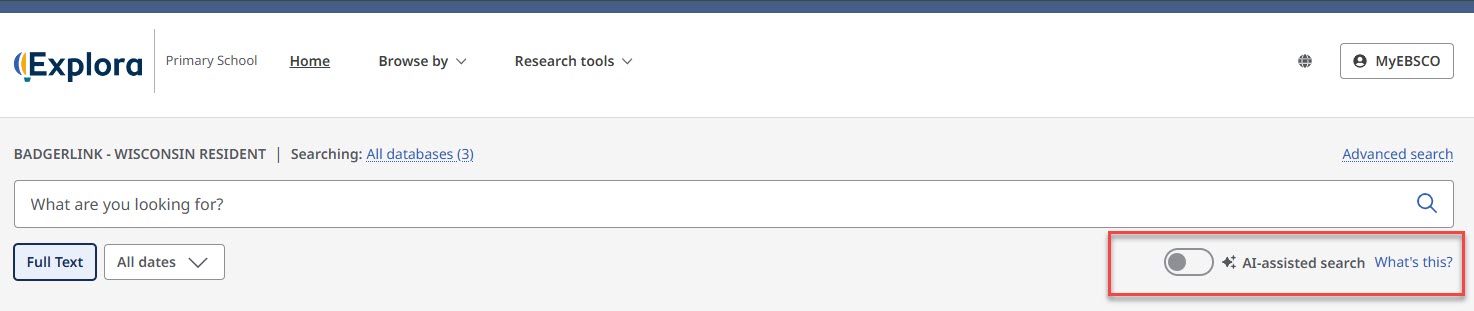
Libraries will continue to have full administrative control through EBSCO Experience Manager (EEM), and any existing customizations or decisions to disable these features will remain unchanged. If you wish, you can still opt out by logging in to EEM and setting the applicable features to Hide. AI-Assisted Search and AI Ask are controlled independently, so both must be set to Hide to opt out of both features. View the full detailed instructions at EBSCO Connect.
More information about AI-Assisted Search and Ask This Document (AI Ask) beta, is available in AI Features Quick Start Guide (EBSCO Connect article).
For questions on these or any BadgerLink resources email badgerlink@dpi.wi.gov.
BadgerLink is made possible through a combination of both state funds appropriated through the biennial budget and Library Services and Technology Act (LSTA) Grants to States funding from the Institute of Museum and Library Services (IMLS).